

Chapter 4 of 19 Getting started
Levels and stats
Every wolf our Warden brings down and every quest they finish fills the experience bar a little. Each level makes them tougher, and the points that come with it are yours to spend.
Experience
The thin bar under your health and mana is your experience. It fills as you defeat monsters and finish quests, and three notches split it into four stretches. Each time it passes a notch you get a point to spend on your stats. When it reaches the end you go up a level, and your health and mana come back full.
Monsters close to your level give the most. The further below you they are, the less they are worth, so a Warden still chasing stray dogs at level twenty will level very slowly. Quests give a lot of experience at once: the main chain alone takes you a good way.
Spending your points
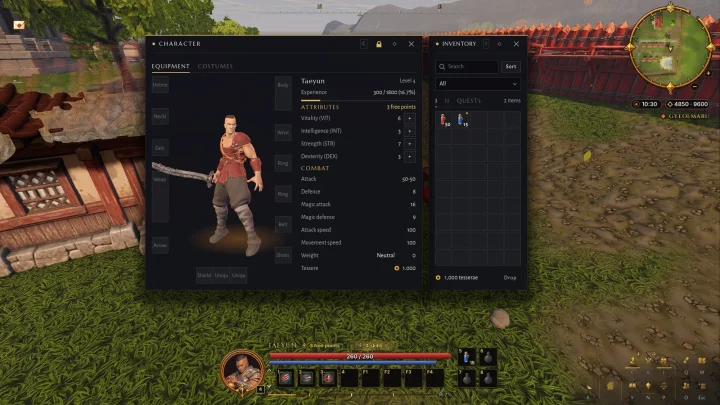
When you have points to spend, a gold diamond lights up on the Character button. Open the character window C and press the ‘+’ next to the stat you want to raise. Hover over a stat to read what each point gives you.
- Strength
- attack. Wardens and Engravers get the most out of each point.
- Vitality
- more health and better defence, magic defence too.
- Dexterity
- you hit more often and dodge more blows.
- Intelligence
- more mana, and stronger magic attack and defence.
Every stat has a ceiling, and after a certain level the points stop coming.
Building a Warden of the Body
The skills of the Way of the Body all grow with Strength, so Strength comes first. Guard Turn and Bulwark Charge also take a little from Dexterity and Vitality, and Vitality keeps you standing when a pack closes in. Intelligence can wait: your skills cost mana, but Stillness Draughts cover that.
Plenty of Wardens build differently. Some put more into Vitality and come back from every fight with health to spare.
The character window
Besides the stats, the character window C shows your equipment around your figure, your level and experience, and the numbers of a fight: attack, defence, magic attack and defence, attack and movement speed. At the bottom you find your Weight and your tesserae.
The character window and the inventory open and move together. The lock on the title separates them.