

Chapter 8 of 19 Gearing up
Tesserae, shops and the Market
Tesserae are the coin of Sedime: pierced metal tokens on a cord. Monsters drop them, shopkeepers pay them, the Smith takes them by the handful. What you do not need you can sell to a shopkeeper, or put on the Market for other players.
Tesserae
One coin is a tessera, though you will mostly hear the plural. Tesserae on the ground are picked up by walking over them, and they belong to whoever gets there first. You can carry a great deal of them, but not an endless amount: near the limit, the Market and trades will tell you there is no more room.
Shops
Click a shopkeeper to see what they sell, such as the Shopkeeper with her draughts. What your class cannot use stays in the list, faded. Buy with a right click, a double click or by dragging an item into your inventory; sell by dragging an item from your inventory onto the window.
Shopkeepers pay only part of what things are worth, minus a small tax, and some items cannot be sold at all. The shops of a kingdom that is not yours ask a lot more. A few shops want goods instead of tesserae, such as Bo-seok, who takes ore for the looks of your horse.
Trading
To trade with a player next to you, right click them and choose ‘Trade’, or drag an item from your bag onto them. Each of you puts in items and tesserae, then you both accept. If either of you changes something, both acceptances are cancelled. A trade happens whole or not at all, and bound items and quest items cannot be given away.
The Market
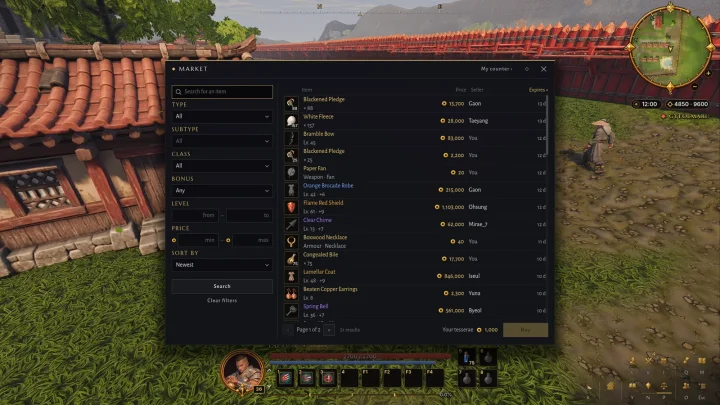
The Market P opens anywhere, and it is the same on every channel: in it you find what other players have put on sale, each at a fixed price in tesserae.
On the left you search by name and narrow the list with the filters: type and subtype, class, a bonus, level and price. Sort the results by price, name, level or newest first. To buy, pick a row and press ‘Buy’, or double click it: the item arrives in your inventory, if there is room and you have the tesserae. If the seller has changed the price in the meantime, the Market tells you before you pay.
To sell, open ‘My counter’. Drag an item from your inventory onto an empty slot, choose the price and, for a stack, how many pieces. The listing stays on sale for two weeks, even while you are not playing, and a right click changes its price or takes it back. The counter belongs to your account, so all your characters see it, and it holds a limited number of listings.
When something sells, the price waits for you under ‘Proceeds’, minus a small Market tax, and you take it with ‘Collect’. Items you take back or that do not sell come back to you. You cannot sell items you are wearing, bound items or timed items. Stalls are gone: everything is sold through the Market.
Storage
The Storage Keeper keeps items for you, and the storage is the same for every character on your account. The first time you pay a small fee to open it; then protect it with a password of your own. It closes if you walk away from the Storage Keeper.
N opens the window ‘Store and storage’. Its Storage tab works only next to the Storage Keeper; its Store tab works anywhere.
The Store
On the website you buy the Store's coins and, with them, items: costumes and hairstyles, scrolls, extra pages for your bag and your storage, and more. ‘Buy on the website’, in the Store tab, opens it in your browser. What you buy arrives in the Store tab N, and from there you only take things out.
The keys of this chapter
- P
- opens the Market, wherever you are.
- N
- opens Store and storage.