

Chapter 6 of 19 Gearing up
Equipment
Every few levels the quests hand our Warden a better sword or cuirass, monsters drop other pieces, and in between you make the ones you have stronger.
Wearing a piece
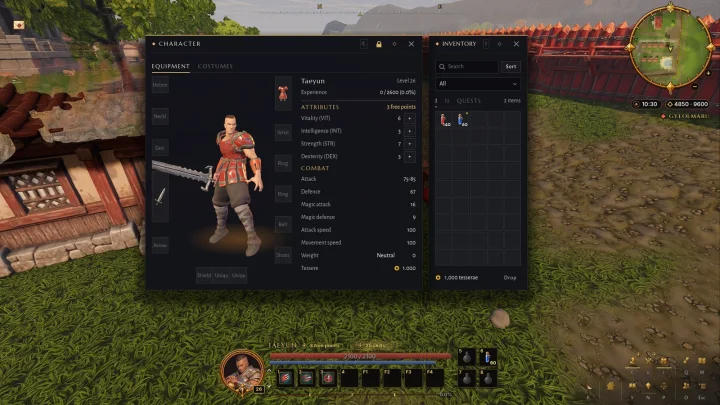
Open the inventory I and double click a piece, or right click it: it goes to its place in the character window C. The description of each piece says who can wear it, by class and level, and sometimes asks for a minimum in a stat.
A Warden fights with a sword or a greatsword, and the Way of the Body works with both. The choice changes how some skills land: with a sword, Three Beats is three quick strikes as you run forward; with a greatsword it is two heavier blows on the spot.
Right after a blow you cannot change your gear, so step back for a moment first. To take a piece off you need a free space in your bag.
The inventory
Your bag has two pages. The filters at the top show everything or only equipment, consumables, materials or quest items, and there is a search and a button that tidies it all up. A small yellow dot marks the items you have not looked at yet.
Quest items go into a page of their own by themselves, and they stay there until the quest needs them.
To throw something away, drag it out of the window onto the ground and confirm. Hold Shift while you drag a stack to split it.
Bonuses
Weapons and armour can carry bonuses: extra lines in the description, such as more health or more damage against certain monsters. Many pieces are born with one or two. You change them with scrolls, dragged onto a piece that is in your bag and not worn.
- The Reweaving Scroll unpicks the bonuses a piece has and weaves the same number back in, chosen again. They may come out better or worse.
- The Added Thread Scroll adds a bonus to a piece that has fewer than four. The more it already has, the more often it fails, and the scroll is spent either way.
Refinement
Almost every piece can be refined one grade at a time, and the grade shows after its name with a ‘+’. A refined piece keeps its bonuses and its Knots.
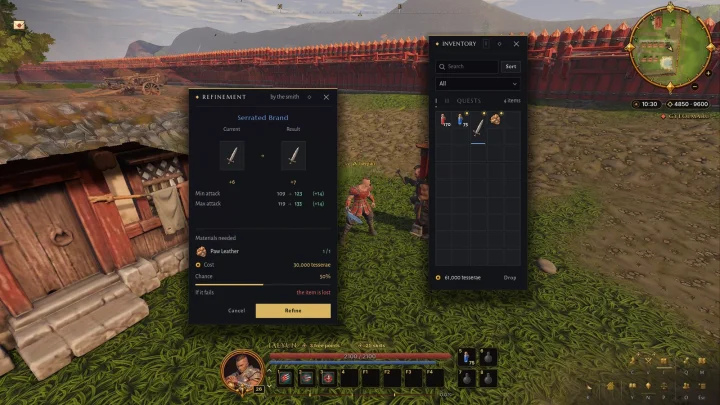
Click the Smith of any village and pick the piece. The window shows what the step takes in tesserae and materials, and the chance of success, which is the real one. If it works, the piece goes up a grade. If it fails at the Smith's, the piece is lost, and so are the tesserae and the materials.
With a scroll, a failed attempt only takes the piece down a grade. You can use one at the Smith's anvil, or on your own by dragging it onto the piece:
- the Scroll of the Crack, which the quests give often;
- the Smith's Notebook, which almost always works on a piece with few grades and less as it climbs;
- the Mending Scroll, which also works less often the further along the piece is;
- the Apprentice's Scroll, from the Store, which makes the first grades certain.
Either way you still pay the tesserae and the materials.
Knots
Some weapons and armour are born with sockets, and the description shows them. Knots go into the sockets: the Knot of Piercing +0, for instance, sometimes lets a blow slip past the target's defence.
Drag a Knot onto the piece. Setting it does not always work: if it fails, the Knot breaks and its broken pieces stay in the socket. A piece cannot hold two Knots of the same kind, and on weapons and armour you cannot open new sockets.
- The Scroll of the Loosened Knot takes every Knot out of a piece and back into your bag.
- The Untier's Handbook clears the sockets taken by broken Knots.
Timed items
Some items, such as costumes, last a certain time and then vanish, wherever they are. The ‘Expires in’ line of the description says how long is left. Some start counting from the first use, others only while you wear them.
The keys of this chapter
- I
- opens the inventory.
- C
- opens the character window.
- Shift
- held while you drag a stack, splits it.