


Chapter 19 of 19 Help
Keys, options and help
The page to keep at hand: every key of the game, the options worth knowing and where to go when something goes wrong. The keys of the quick bar can be changed in the Options; the others stay as they are.
Windows
- C
- the character window.
- V
- skills.
- I
- the inventory.
- Q
- the Journal.
- M
- the map of the zone; from there you open the world map.
- P
- the Market.
- N
- the Store and storage.
- J
- feats.
- K
- the Collection with your familiars and mounts.
- Y
- the Guide, with these chapters. With the pointer on an item, it opens that item's page.
- U
- the emoji: pick one with a click or a number key.
- O Alt+M
- friends.
- Alt+G
- the loom.
- Esc
- closes the open windows; with nothing to close, it opens the menu.
Moving and fighting
- W A S D
- to walk; a click on the ground works too.
- Right mouse button
- held, turns the camera; a click on a character opens their menu.
- Wheel
- brings the camera closer or further.
- Tab
- picks the nearest monster.
- Space
- attacks, and keeps attacking while held.
- Esc
- drops the target.
- Z
- picks up the nearest item.
- Alt
- held, shows the names of everything on the ground and the next page of the quick bar.
- 1 2 3 4 F1 F2 F3 F4
- the slots of the quick bar.
- 5 6 7 8
- the potion slots.
- Shift+1 Shift+2 Shift+3 Shift+4
- pick the page of the quick bar.
The horse
- Ctrl+H
- get in the saddle or down.
- Ctrl+F
- feed the horse.
- Ctrl+B
- send it back.
- Ctrl+G
- ride a mount.
- Ctrl+J
- get down from a mount; on foot, it uses the first mount seal in your bag.
- X
- in the saddle, the easy gaits.
- Shift
- in the saddle, the gallop; twice, the sprint.
- R
- full tilt.
- Space
- in the saddle, the bow.
- E F T
- the gestures.
- L
- the cinema camera; the arrow keys choose its side.
The bottom right bar
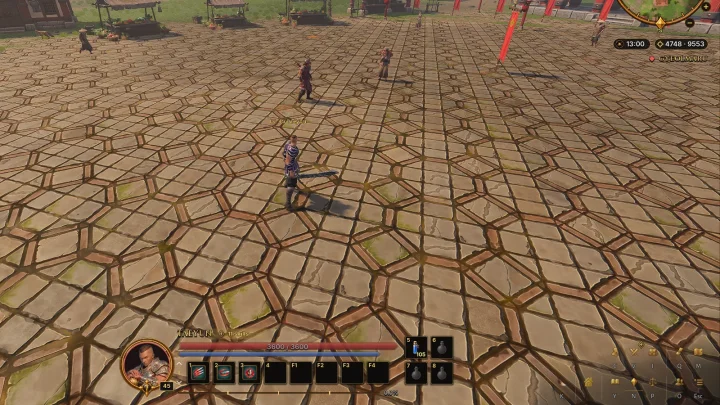
In the bottom right corner a bar holds one button for each window, with its key under it: Character, Skills and Inventory; Journal and map; the Collection; Back to the village, which has no key; Guide, Store and Market; Friends and the menu.
The menu
Esc with nothing open brings up the menu. Under Game you find the Options, the Guide, How to play, the Feats and the Collection; under Help, Unstick character and Report a bug; under Exit, Change character, Back to login and Quit the game.
Options
Changes apply right away. A few worth knowing:
- Interface
- the size of the interface, the colour of names, the damage numbers (All, Only mine, Compact or Off), the size of the cursor, the language, and Replay the first steps.
- Graphics
- Quality, from Low to Ultra or Automatic, and the fog, Clear or Faithful to the original. Screen effects turns on and off the low health warning, the raindrops on the camera, the souls of defeated monsters, the fauna spirits and the camera effects at a gallop.
- Controls
- how much the camera shakes, how wide it sees and how smoothly it moves, Reduce motion, the cinema camera on horseback and its side, and the keys of the quick bar.
- Game
- your PvP mode.
- Social
- what you block.
Photos
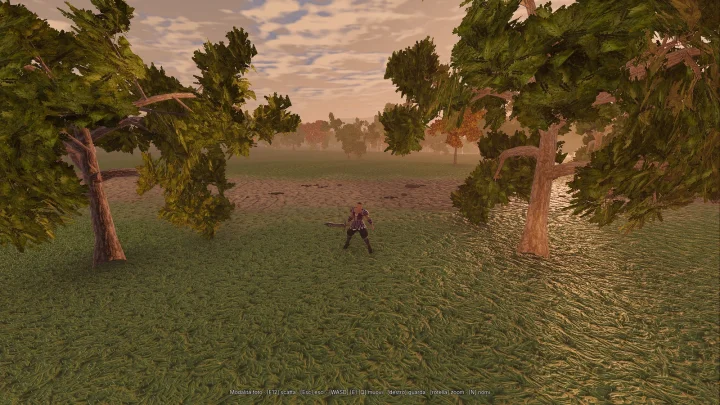
F10 enters photo mode: the interface disappears and the camera is free. Move it with W A S D, E and Q for up and down, hold Shift to go faster, the right mouse button to look around and the wheel to change the field of view. N shows or hides names, F12 takes the picture, Esc or F10 takes you back to the game.
Reporting a bug
If something goes wrong, open the menu Esc and choose Report a bug. Write what happened, and attach a screenshot of the game and the game log if you like. The place, the time and the version are added by themselves.
Chat commands
- Enter opens the chat and sends. In front of the text, ! shouts to the kingdom, # speaks to the party, % to the loom.
- /w followed by a name and the text sends a private message; Shift+Enter opens one with no name yet.
- /unstuck does the same as Unstick character, /village the same as Back to the village.
- /ride and /unmount do the same as Ctrl+G and Ctrl+J.
- /logout, /quit and /phase_select leave the game or go back to the choice of character, like the entries of the menu.