

Chapter 3 of 19 Getting started
Fighting
The first monsters wait just past the village gate: stray dogs, then wolves. Our Warden walks out with the sabre from the Wooden Casket and twenty Sap Draughts, which is enough for the dogs and not quite enough for the wolves.
Picking a target
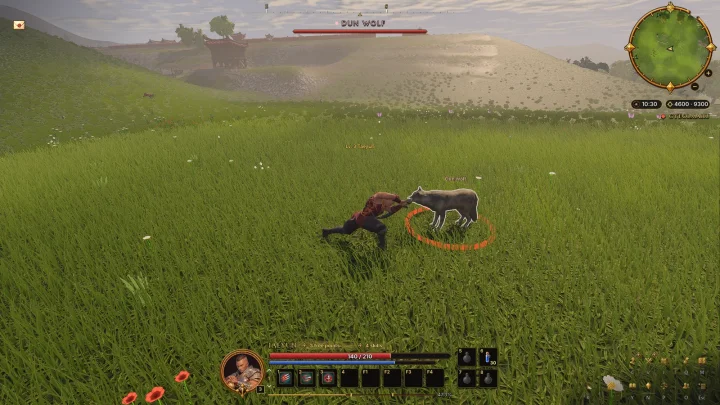
Click a monster to pick it, or press Tab to take the nearest one. Its name, level and health appear at the top of the screen, and under the name one word tells you how the fight will go for you:
- Easy, in green
- go ahead.
- Fair, in plain white
- a proper fight.
- Hard, in gold
- bring draughts, or a friend.
- Too strong, in red
- walk away while you still can.
A few more words may follow. Attacks on sight means it comes for you the moment it sees you, without waiting to be hit. Drops very little and Drops nothing tell you not to expect much from it.
Esc drops the target.
Striking
Click a monster you can attack and your Warden goes for it on their own. Hold Space and they keep swinging, blow after blow, at the pace of their weapon. Let go and they stop.
When a monster falls, the items it drops are yours for a short while: other players can see them, but only you and your party can pick them up. The tesserae belong to nobody, so whoever gets there first takes them.
Z picks up the nearest item, and so does a click on it. Hold Alt to read the name of everything lying on the ground.
The quick bar
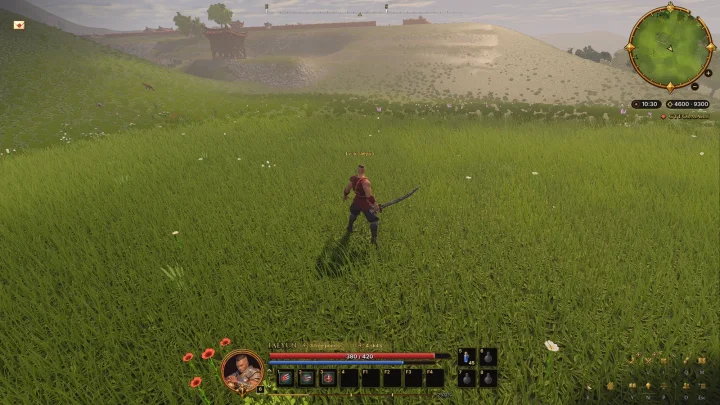
At the bottom of the screen sits the quick bar. It has eight slots for skills and items, used with 1 2 3 4 and F1 F2 F3 F4, and four more for potions, used with 5 6 7 8.
Drag a skill from the skills window V or an item from your inventory I onto a slot. A potion goes into the potion slots by itself. Right click a slot to empty it.
The bar has four pages, and the potion slots stay the same on all of them. Shift+1 to Shift+4 pick a page, the arrows beside the bar turn them, and holding Alt shows the next one for as long as you hold it. Every key of the bar can be changed in the Options, under Controls.
Draughts
The Sap Draught (S) brings your health back a little at a time, the Stillness Draught (S) does the same for mana. The Wooden Casket of your first login holds a good supply, the quests of the first levels add more, and the Shopkeeper of every village sells plenty.
Drink one while you still have some health left: it comes back over a few seconds, and the wolf will not wait for you.
Effects
Every draught or skill that is helping you puts an icon at the top left of the screen, with the time left under it. Hover over an icon to read what it does.
When you fall
When your health runs out, the screen tells you who did it. You choose where to get up:
- Back to the village
- you get up in the village of the map, or in the capital of your kingdom, and lose no experience.
- Get up here
- you get up where you fell, a few seconds later, but you may lose some experience.
In a dungeon there is also Leave the dungeon. If you choose nothing, after a while you go back to the village by yourself, with half your health. For a moment after you get up, monsters leave you alone.
Experience is never lost before level ten, and even later not every time. If you carry a Second Chance Feather, it pays in your place and is used up.
Stuck
If you end up somewhere you cannot walk out of, there are two ways back.
- Back to the village, the button at the bottom right, takes you to the village after a short countdown. Press it again during the countdown to cancel. Then it needs a rest before you can use it again.
- Unstick character, in the menu Esc under Help: stand still and out of any fight for a few seconds and you go back to the village of your kingdom. You can use it every quarter of an hour. In chat, /unstuck does the same.
The keys of this chapter
- Tab
- picks the nearest monster.
- Space
- attacks, for as long as you hold it.
- Esc
- drops the target.
- Z
- picks up the nearest item.
- Alt
- shows the names of what lies on the ground, and the next page of the quick bar.
- 1 2 3 4 F1 F2 F3 F4
- use the slots of the quick bar.
- 5 6 7 8
- drink from the potion slots.