


Chapter 16 of 19 Together
In company
A Warden of the Body is built to stand in front, and standing in front works better with someone behind you. Sedime has a party for the hunt, a loom for the people you want to keep, and a chat for everyone else.
The party
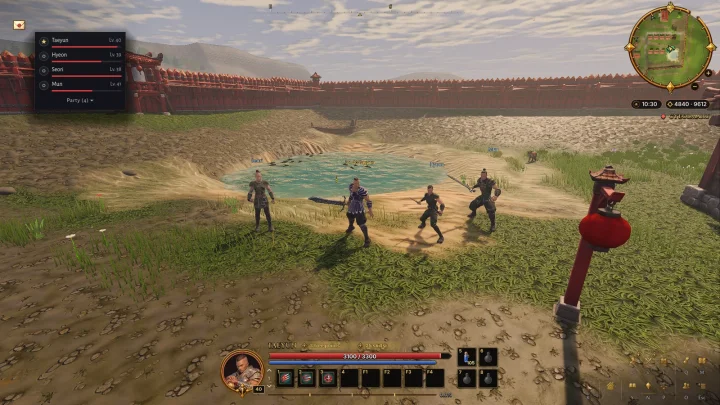
Right click a player and choose ‘Invite to party’. A party holds up to eight, all from the same kingdom and not too far apart in level, and nobody can be invited inside a dungeon. Party members cannot hit each other.
Whoever stays near the monster when it falls shares the experience, and the more of you there are, the bigger the bonus. The leader chooses how to split it, by level or in equal shares, and gives each member a role: Attacker, Brawler, Blocker, Skill master, Berserker or Defender. Each role gives a bonus to the others nearby, shown on the party panel at the top left. The loot of a monster goes to the members nearby in turn.
To speak to the party only, start your message with #.
Friends and private messages
O opens your friends, and Alt+M does too. Add a friend from there or from the menu of a player; they have to accept. Friends who are online come first, with a green mark.
To write to one person only, click their name in the chat, type /w followed by the name and the text, or press Shift+Enter. Every conversation gets its own small window, which you can shrink to a letter at the edge of the screen.
In the Options, under Social, you can block trades, party and loom invitations, private messages and friend requests.
The chat
Enter opens the chat and sends the message. The tabs above it filter what you read: All, Nearby, Party, Loom, Shout, Private, System.
- With no sign in front, everyone nearby hears you.
- ! in front shouts to the whole kingdom. Shouting starts at level fifteen and needs a pause between one shout and the next.
- # speaks to the party, % to the loom.
Emoji
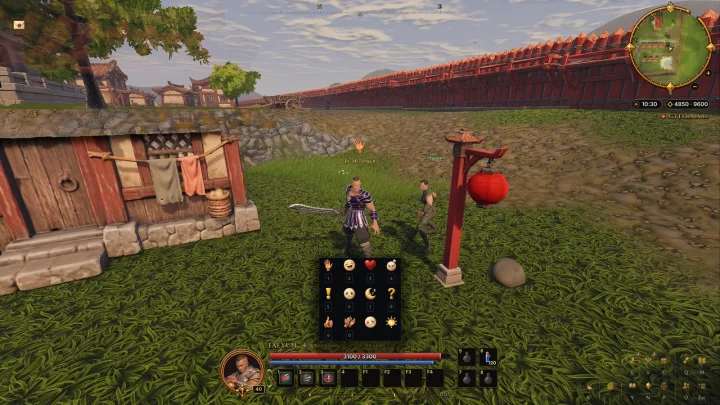
U opens the emoji: twelve small painted faces and signs, from a wave to a yawn. Pick one with a click or a number key and it appears over your head for a moment, for everyone around to see.
The loom
A loom is what other games call a guild. From level thirty, the Keeper of your capital, such as the Keeper of Hongsa, founds one for whoever brings thirty thousand tesserae and the New Loom Book. The two bosses shared by the second villages always drop the book, and the Keeper keeps it along with the tesserae. Then you invite players of your kingdom from their menu.
Alt+G opens the loom window: the Info page with the loom's level and members, the Board for notices, the list of Members, and the ranks. A loom grows with the experience its members pour into it, and the leader gives out ranks and decides what each rank may do. To speak to the loom only, start your message with %.
From the Info page the leader can challenge another loom, and the other leader must accept. A loom needs at least eight members to take part. While a challenge is on, nobody earns hunting experience. The Herald of your capital lists the challenges you can watch.
The keys of this chapter
- Enter
- opens the chat and sends.
- Shift+Enter
- opens a private message.
- O Alt+M
- open your friends.
- U
- opens the emoji.
- Alt+G
- opens the loom.